How to Avoid Data Entry Errors in Business in 2026
Discover how to eliminate up to 90% of manual data entry errors in SMEs using source validation, API automation, and artificial intelligence.
Jean Willame · August 4, 2026 · 6 min

Quick answer. To learn how to avoid data entry errors in smes, the solution lies in combining source validation, eliminating free text, and automating via direct integrations. By replacing manual entry with automated extraction and integrity checks, an SME reduces mistakes by 90 % while preserving compliance and profitability.
Why this bottleneck matters
Manual entry represents a costly operational flaw for SMEs. Copying addresses, registration numbers, or amounts from an email into a spreadsheet makes human error inevitable, leading to delays and disputes.
According to France Num Data quality: a strategic lever for business, inaccurate data hinders executives’ strategic decisions and the deployment of artificial intelligence. From a regulatory standpoint, the GDPR states that inaccurate data is non-compliant. Resolving this bottleneck is therefore a management and compliance priority.
What are the hidden costs of data entry errors for an SME?
Data entry errors generate hidden costs far exceeding initial rekeying time. The first cost lies in rework: correcting a purchase order or an invoice requires mobilizing two to three people to identify the discrepancy, reissue the document, and reassure the client.
The financial impact of manual data entry errors in smes in 2026 takes three main forms:
- Direct cash flow losses: Payment delays caused by rejected invoices due to errors in names, amounts, or VAT numbers.
- Wasted payroll: Qualified teams spending up to 20 % of their time on manual checks and corrections.
- Brand reputation damage: An incorrect address or misspelled name immediately tarnishes professional credibility.
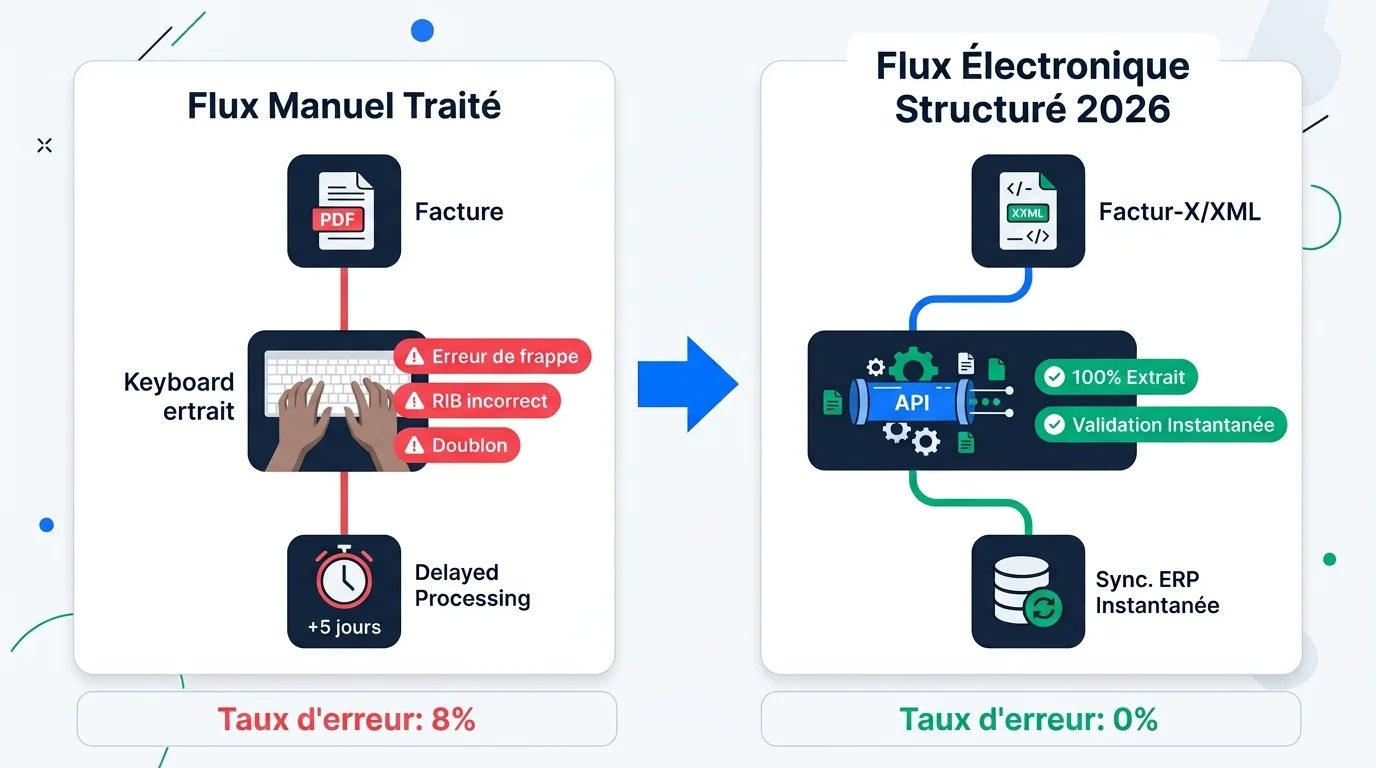
According to the DGFiP practical guide E-invoicing: practical startup guide for September 1, 2026, mandatory reception of electronic invoices applies to all French SMEs starting September 1, 2026, prior to the issuing mandate in September 2027. Under this framework, flows will transit as structured data via a Partner Dematerialization Platform (PDP) or the Public Invoicing Portal (PPF), where the slightest typo blocks accounting processing.
How to eliminate manual data entry errors in Excel?
Spreadsheets remain the preferred tool for teams, but they are also the primary source of operational slips. To understand how to reduce manual data entry errors in excel for operations leaders, transforming your spreadsheets into structured forms governed by logical rules is essential.
The first step is eliminating free-text entry in standardized columns using Excel validation rules (dropdown lists, numeric masks, enforced character lengths). Formula locking prevents accidental overwrites, while the XLOOKUP function dynamically retrieves information from a single reference table.
What native Excel validation can secure
- Format control: Enforcing valid date, integer, or decimal inputs.
- Value standardization: Using dropdown lists to prevent spelling variations.
- Formula protection: Locking sheets to prevent unintended modifications.
- Visual alerts: Conditional formatting to highlight duplicates or missing entries.
What Excel validation cannot resolve
- Lack of synchronization: Persistent risk of proliferating file versions.
- Inability to verify real-world existence: Impossible without scripts to verify if a business ID exists in an official registry.
- Initial manual entry: Validation does not prevent typing a wrong number if the format is valid.
- Lack of audit trail: Difficulty identifying who made a change without advanced logging.
What tools help verify the validity of entered data?
To establish true Data Quality Management, companies must rely on tools capable of intercepting anomalies before they are saved.
In its guide on development security, the CNIL Security: Framing IT developments recommends embedding strict input controls and minimizing free-text fields, known sources of inconsistencies and non-compliant data.
Verification tools fall into several major categories:
| Tool category | Type of check performed | Priority SME use case | Best practice |
|---|---|---|---|
| Smart forms (Typeform, Tally, Fillout) | Input masks, conditional fields, email validation | Information capture from prospects or customers | Clean collection of inbound data without internal manual entry |
| Verification APIs (Insee, Mailgun, Google Maps) | Real-time validation of legal existence (SIRET), address, or email | Automatic qualification of customer or supplier files | Instant enrichment and control during record creation |
| Relational databases (Airtable, Baserow) | Strict column typing, relational links, blocking formulas | Product catalog management, project tracking, inventory | Replacing shared Excel files with a structured database |
| OCR engines (Mindee, Docparser) | Conversion of unstructured documents (PDFs, scans) into data | Processing supplier invoices, expense reports, and delivery slips | Digitization without manual rekeying of physical documents |
Integrating a business directory API into the CRM, for example, automatically fills in the company name and address as soon as the first 9 digits are entered.
How to automate business data entry in 2026?
Automation represents the most radical answer to daily rekeying by eliminating human intervention in data transfers.
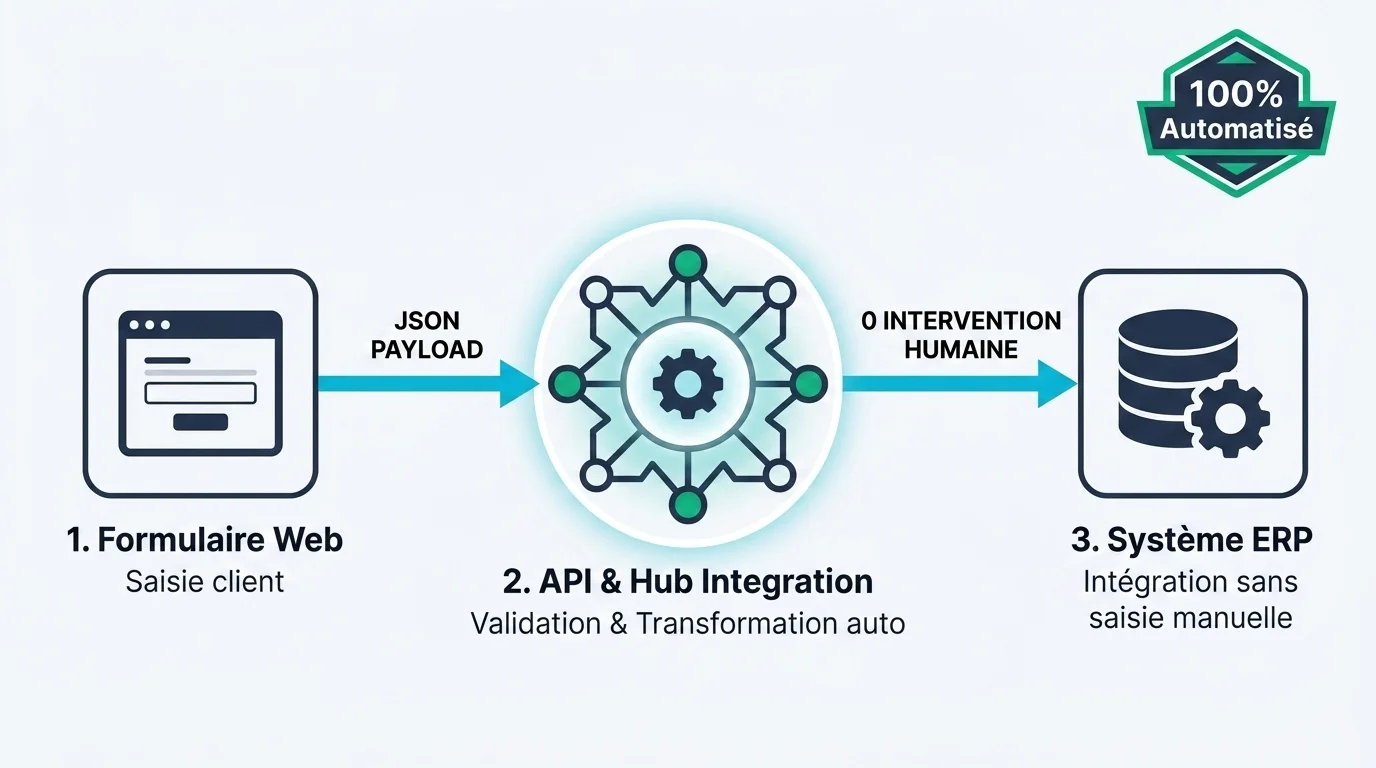
To deploy an accounting data entry error automation solution for smes in 2026, no-code platforms like Make, Zapier, or n8n allow you to connect web forms, emails, CRM, and your ERP and API integration. As soon as a customer places an order, data is injected into invoicing and inventory systems without manual rekeying. For legacy software without open APIs, Robotic Process Automation (RPA) automatically replicates clicks and keystrokes.
In a case study published by France Num A small business revolutionizes order management with an AI-integrated automation solution, a small business that automated order entry freed up 23 hours of work per week while completely eliminating encoding errors. To evaluate your project’s feasibility or design an anti-invoice-entry-error method without changing erp, you can review the diagnostic approach offered by Jean Willame, specialized in process automation for SMEs.
How can AI correct data entry?
Integrating generative AI tools and specialized extraction models transforms unstructured document management. Historically, traditional Optical Character Recognition (OCR) failed whenever layouts changed.
Today, ai tools to automatically correct data entry errors in 2026 combine computer vision and natural language understanding. AI analyzes a PDF or email, extracts key entities (supplier, amounts, VAT, due date), and checks internal figure consistency.
According to the guide by France Num AI Assistant: beginner’s guide to automating tasks in your SME, AI-assisted automation eliminates systematic rekeying mistakes. With only 3 % of SMEs having taken the leap, this represents a major competitive lever. In practice, if a quote has an incorrect VAT calculation, AI flags the anomaly for an operator rather than inserting corrupted data into your ERP.
How to train teams to reduce inadvertent mistakes?
The human dimension remains decisive. Even with the best tools, unclear responsibilities or operational fatigue will still lead to unrecoverable mistakes.
To establish an internal procedure to limit typing and data entry errors, the first step is drafting a Data Dictionary. This document defines official casing (uppercase/lowercase), date formatting (DD/MM/YYYY), and allowed or forbidden abbreviations.
Implementing double entry and integrity checks or peer validation on high-value transactions drastically reduces risks. Finally, training employees on keyboard shortcuts, form managers, and text expansion relieves mental load and preserves focus.
What is the best anti-data-entry-error strategy in 2026?
The best anti-data-entry-error strategy in business in 2026 relies on the “Zero Manual Data Entry” principle. The goal is to eliminate friction points where a human manually rekeys information that already exists digitally.
As highlighted by the Ministry of Economy on e-invoicing in 2026 E-invoicing arrives in 2026, mandatory adoption of structured data eliminates manual entry and typing errors while preventing lost documentation.
Four pillars comprise this strategy:
- Entry at the source: Transfer initial entry to the customer or supplier via secure forms.
- API integration: Directly synchronize business software to propagate updates.
- Automated extraction (AI/OCR): Convert incoming documents (PDFs, images) into actionable data.
- Preventive controls: Lock input fields with strict validation masks.

Step-by-step methodology: securing your data flows in 5 steps
Here is the sequential process to eradicate data entry errors in your organization:
- Map entry points (3 to 5 days): Identify workflows where data is recopied from Tool A to Tool B (emails to CRM, orders to ERP). Prioritize high-volume workflows.
- Standardize validation rules (2 to 4 days): Implement dropdown lists, required fields, and format masks on your current forms and tools.
- Deploy No-Code or API integration (1 to 2 weeks): Automate data transfer via Make or Zapier to bypass manual intervention.
- Implement an OCR/AI solution (1 to 2 weeks): Configure automated processing for recurring invoices and purchase orders, keeping human validation only in edge cases.
- Audit data quality monthly (0.5 day/month): Analyze the database to detect duplicates or format anomalies and fix root causes at the source.
Want to identify your bottlenecks and get an immediate action plan? Request a personalized diagnostic for your operational process automation and secure your data quality starting today.
Frequently asked questions
What is the difference between OCR and AI-based automation?
Traditional OCR converts text from an image into digital characters without understanding context. AI analyzes the document’s meaning and extracts key data points precisely, even if the layout varies.
Is it mandatory to change ERPs to eliminate data entry errors?
No. No-code tools or API connectors allow you to clean and automatically inject data upstream of your current ERP, without modifying your existing infrastructure.
What is the average error rate for manual data entry?
The average error rate for uncontrolled manual data entry ranges between 1 % and 4 %. This figure increases during repetitive tasks, fatigue, or interruptions.
How can you convince teams to abandon manual Excel files?
Show them the time saved on tedious tasks. By providing simple forms with dropdown lists, you reduce their stress and allow them to focus on value-added missions.
What are the legal risks of improper customer data entry?
GDPR requires maintaining accurate personal data. Keeping incorrect information or collecting sensitive data in free text exposes the company to regulatory penalties and disputes.
Is double entry still an effective method in 2026?
Although it helps detect certain inconsistencies, double entry remains costly and time-consuming. In 2026, it should be replaced by integrity checks and automated API validations.
How much does it cost to set up anti-error automation for an SME?
Thanks to No-Code platforms, the cost is limited to a few dozen euros per month in software subscriptions. Return on investment is typically achieved within a few weeks due to the time saved.
How does mandatory e-invoicing in 2026 help reduce errors?
The reform mandates the exchange of invoices as structured data via dedicated platforms (PDP/PPF). This eliminates the need to re-key amounts and bank details, eliminating typos.
Sources
- Data quality: a strategic lever for business , France Num guide explaining strategic, financial, and regulatory impacts related to data quality in business.
- E-invoicing: practical startup guide for September 1, 2026 , Official DGFiP publication detailing the schedule and operation of PDP/PPF platforms.
- E-invoicing arrives in 2026 , Ministry of Economy leaflet explaining operational gains from eliminating manual invoice entry.
- AI Assistant: beginner’s guide to automating tasks in your SME , France Num practical guide detailing adoption levels of AI-assisted automation in French SMEs.
- A small business revolutionizes order management with an AI-integrated automation solution , France Num case study illustrating the elimination of encoding errors and saving 23h/week through automation.
- Security: Framing IT developments , CNIL recommendations on eliminating free-text fields and implementing strict validation masks.